What We’re Voting On: Will owners of homes at Desert Mountain be prohibited from leasing their homes to anyone other than DM Club members or DM home owners for less than 30 days? Brokers affiliated with the DM HOA or the DM Club would be exempt from these restrictions. For example, should guests for a wedding at Desert Mountain be prohibited from leasing a Desert Mountain home from the owner for a few days or a week? Will owners of Desert Mountain homes be prohibited from exchanging their homes with others for less than 7 days? Note that both restrictions (30-day minimum rental and 7-day minimum exchange) are included in a single proposal. Owners can not vote on one or the other. It’s all or nothing.
A YES vote allows the DMMA Board to write these use restrictions into our CC&Rs.
A NO vote keeps DMMA CC&Rs unchanged.
The amendment fails if less than two-thirds (2/3) of the votes cast are YES.
Paper Voting: Every owner at DM has one vote per parcel owned. There are 2,371 parcels in DM. A 25% quorum (593 votes) is required to validate this referendum. Paper ballots were sent by the U.S. Postal Service to the billing address of every DM owner on April 13, 2018. Owners of multiple lots should receive multiple paper ballots. Each ballot has a unique 16-digit voting access key. To vote on paper, mark your ballot with black ink and mail or deliver the marked ballot to Desert Mountain Master Association, 10550 E. Desert Hills Drive, Suite 100, Scottsdale, AZ 85262. You can also fax your marked ballot to 480-488-7484 or email a clear photo of your marked ballot to hoa@desertmthoa.com.To be counted, your vote has to be received in the DMMA office by 3 PM on Tuesday, May 1, 2018.
Electronic Voting: E-Voting on the web is safe, secure, anonymous and far more cost effective. The E-Voting system will only be available between April 136, 2018 and midnight April 30, 2018.
The ballot you receive in the mail will include a unique 16-character voting access key and instructions on how to use the electronic voting system Election Buddy. When you receive your ballot via US Postal Service, browse to https://electionbuddy.com/vote. Enter the voting access key, including the dashes, into the voting box.
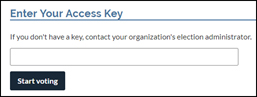
Then click the Start voting button. Your ballot will appear. To vote, click either YES (approve) or NO (do not approve) or ABSTAIN. If you abstain, your vote will be counted toward the quorum requirement only. Then click to verify your vote. When satisfied that your vote is recorded correctly, click Submit. You can vote only once for each voting access key you receive. If you own multiple DM parcels, enter the next key after each vote is submitted.
 Desert Mountain Homeowners Coalition